

Part 1: Quick-Impact Culture & Employee Engagement Frameworks
Building workplace culture requires shifting recognition out of closed, one-on-one silos and putting it into shared corporate spaces where it can scale.
1. The “Peer-to-Peer Spotlight” Campaign
Create a weekly, lightweight submission pipeline where team members nominate colleagues who went above and beyond to support a project or help a teammate. Instead of leaving these buried in an isolated Slack channel or an obscure email thread, display them prominently on shared dashboards, breakroom screens, and main office hubs.
- Why it works: Recognition is highly contagious but easily obscured by the noise of daily operations. Moving peer appreciation from private chat threads into shared visual environments creates a public record of success. This directly reinforces psychological safety and keeps cross-departmental teams aligned on cultural values.
- Primary Focus: HR & Culture
- Target Audience: All Staff
- Weekly Prep Time: 10–15 minutes
- Materials Needed: Submission form (Google Forms/Typeform), centralized display template
- Works Remote: Yes
2. The “Did You Know?” Onboarding Grid
Ditch the long, dry introduction email that employees skim once and immediately archive. Instead, use a highly structured visual profile card for every new hire. This card should list their official title, department, a quirky or unexpected non-work skill, and a high-quality photo.
- Why it works: This format democratizes the onboarding process. When existing staff members pass a lobby screen or open a central team dashboard and see a new face paired with an accessible, humanizing fact, it completely removes the awkwardness of initial introductions. It provides natural conversation starters in the hallway, the kitchen, or the minutes before a Zoom meeting starts.
- Primary Focus: HR & Talent Retention
- Target Audience: Onboarding Cohorts & Existing Staff
- Weekly Prep Time: 15 minutes per new hire
- Materials Needed: Standardized graphic grid, brief onboarding questionnaire
- Works Remote: Yes
3. The “Pulse Check” Feedback Loop
Deploy a weekly, single-question micro-survey focusing on a specific workplace element (e.g., “How clear are our goals this week?” or “Rate our current cross-team collaboration”). Display the real-time, aggregated results transparently across company dashboards alongside a quick action item the leadership team is taking based on the previous week’s feedback.
- Why it works: Traditional annual engagement surveys suffer from delayed action; by the time leadership acts on the data, the cultural context has shifted. Micro-surveys provide immediate, actionable feedback. Publicly sharing the results along with leadership’s response proves to employees that their input directly drives corporate change, exponentially increasing future survey participation.
- Primary Focus: People Operations & Leadership Trust
- Target Audience: Entire Organization
- Weekly Prep Time: 5 minutes
- Materials Needed: Polling tool, real-time data visualization layout
- Works Remote: Yes
4. Milestone Overviews (Birthdays & Work Anniversaries)
Automate a visual calendar that pulls upcoming birthdays and major work anniversaries into a clean, rotating graphic. Ensure that milestones for five-year or ten-year veteran employees include a brief quote from their direct manager highlighting their historical contributions.
- Why it works: Longevity should be celebrated publicly. When frontline or junior staff see long-term tenure recognized openly by leadership, it subtly communicates that the organization is a viable, rewarding path for long-term career growth. It transforms a routine administrative metric into a retention tool.
- Primary Focus: HR & Culture
- Target Audience: Office and Frontline Staff
- Weekly Prep Time: Automated (5 minutes review)
- Materials Needed: HRIS data sync or static spreadsheet
- Works Remote: Yes
Part 2: High-Velocity Operational Efficiency Playbooks
Operational communication is about removing data friction. These frameworks focus on getting crucial production, compliance, and logistics data in front of teams without disrupting their workflows.
5. Live KPI & Performance Dashboards
Extract critical operational metrics—such as weekly fulfillment rates, current open customer support tickets, or manufacturing safety milestones—and display them cleanly on centrally located screens or main corporate landing pages. Avoid hiding this data behind complex enterprise software logins that only upper management can access.
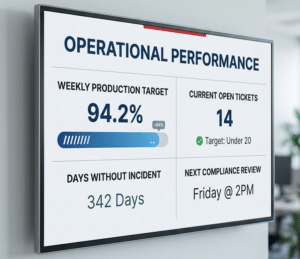
- Why it works: Total corporate alignment. When frontline workers, warehouse staff, or customer success teams can see their real-time performance relative to company targets without hunting for it, ambiguity is eliminated. Transparency naturally drives operational performance by fostering a shared sense of ownership over day-to-day outcomes.
- Primary Focus: Operations & Revenue Teams
- Target Audience: Frontline & Floor Workers
- Weekly Prep Time: One-time integration setup
- Materials Needed: Business Intelligence tool (PowerBI, Looker) or live data feed
- Works Remote: Yes (via virtual dashboard embeds)
6. Emergency & Policy Broadcast Flashes
Establish an explicit protocol for instantly overriding all standard internal communications, digital signage, and messaging feeds to push critical, high-priority safety drills, IT network outages, or building maintenance updates.
- Why it works: Traditional channels like email or chat apps are far too slow when addressing immediate operational disruptions. A universal visual override guarantees that 100% of personnel in a physical space or on an active digital network receive critical instructions simultaneously, mitigating compliance risks and keeping teams safe.
- Primary Focus: Facilities, Safety, & IT Operations
- Target Audience: Entire Workspace Personnel
- Weekly Prep Time: Low (Requires pre-built override templates)
- Materials Needed: Dynamic multi-channel broadcast software
- Works Remote: No (Optimized for physical or hybrid facilities)
7. Shift Change Handover Summaries
For environments running multiple shifts (warehousing, manufacturing, healthcare), implement a standardized, highly visual 3-bullet summary displayed at shift entrance points. This should explicitly highlight what the previous shift accomplished, what immediate challenges remain, and the core focus for the incoming crew.
- Why it works: The handoff between shifts is one of the most common friction points for operational errors and dropped production metrics. A clear, visual summary ensures incoming workers do not have to spend the first 30 minutes of their shift tracking down supervisors or digging through logbooks to understand where production stands.
- Primary Focus: Plant Managers & Shift Supervisors
- Target Audience: Incoming & Outgoing Crews
- Weekly Prep Time: 5 minutes per shift change
- Materials Needed: Simple digital text template or shared document feed
- Works Remote: No
8. Vendor & Inventory Logistics Trackers
Keep real-time delivery windows, incoming freight schedules, or critical parts shortages visible on the warehouse floor or in logistics back-offices. Use color-coded alerts (Green/Yellow/Red) to denote status updates.
- Why it works: Supply chain and inventory adjustments require rapid responses from floor staff. When teams can visually monitor inbound logistics, they can proactively adjust workflows, prep receiving docks, or reallocate labor hours ahead of time, turning a chaotic reactive process into an orderly proactive routine.
- Primary Focus: Supply Chain & Logistics
- Target Audience: Receiving and Warehouse Staff
- Weekly Prep Time: Automated integration
- Materials Needed: Inventory Management system webhooks or shared spreadsheet
- Works Remote: No
Part 3: Executive Leadership & Strategic Alignment Templates
Misalignment happens when executive strategy stays locked away in boardrooms. These frameworks bridge the gap between high-level vision and daily execution.
9. The “Quarterly OKR Tracker” Progress Wall
Break down complex, high-level corporate goals into digestible, visual progress bars. Update these metrics bi-weekly, featuring clear annotations showing which departments are moving the needle on specific key results.
- Why it works: Employees frequently experience a disconnect between their daily tasks and the company’s broader mission. Visually connecting day-to-day operations to macro-level objectives builds engagement. It shows your staff exactly how their labor directly impacts the organization’s bottom line and long-term success.
- Primary Focus: Executive Leadership & Strategy
- Target Audience: All Corporate Staff
- Weekly Prep Time: 30 minutes bi-weekly
- Materials Needed: OKR software data export or clean visualization layout
- Works Remote: Yes
10. The “Town Hall Snippet” Loop
Instead of assuming every employee will watch a recorded 60-minute quarterly meeting, extract 30-second video clips or high-impact text quotes covering the most vital takeaways, core product reveals, or strategic pivots. Loop these across team spaces for the two weeks following the event.
- Why it works: It matches modern information consumption habits. Content micro-dosing makes your executive messaging accessible to employees who missed the live call due to time-zone challenges, client meetings, or frontline duties. It guarantees your most critical corporate messages are reinforced, not forgotten.
- Primary Focus: Corporate Communications
- Target Audience: Entire Enterprise Workforce
- Weekly Prep Time: 20 minutes post-town hall
- Materials Needed: Basic video editing or quote template formatting
- Works Remote: Yes